An adtech company came to us needing to improve how they were producing creative — the process was slow, inconsistent, and not scaling with the team's ambitions. With Figma's Config 2026 conference as the campaign moment, we had one session to scope the problem, research the competitive landscape, and produce the first wave of assets. What follows is an honest account of the workflow: which tools handled which step, where the seams showed, and what the output actually looked like.
The brief covered eight deliverables: competitor ad research, brand-aligned image prompts, banner ads in four formats, a campaign landing page (desktop and mobile), UGC-style social video, and a merch design. We ran it start to finish with Claude, Apify, Figma, and Gemini. No handoffs to a separate creative team. No briefing cycle.
Step 1: Brand context and tone of voice in Claude
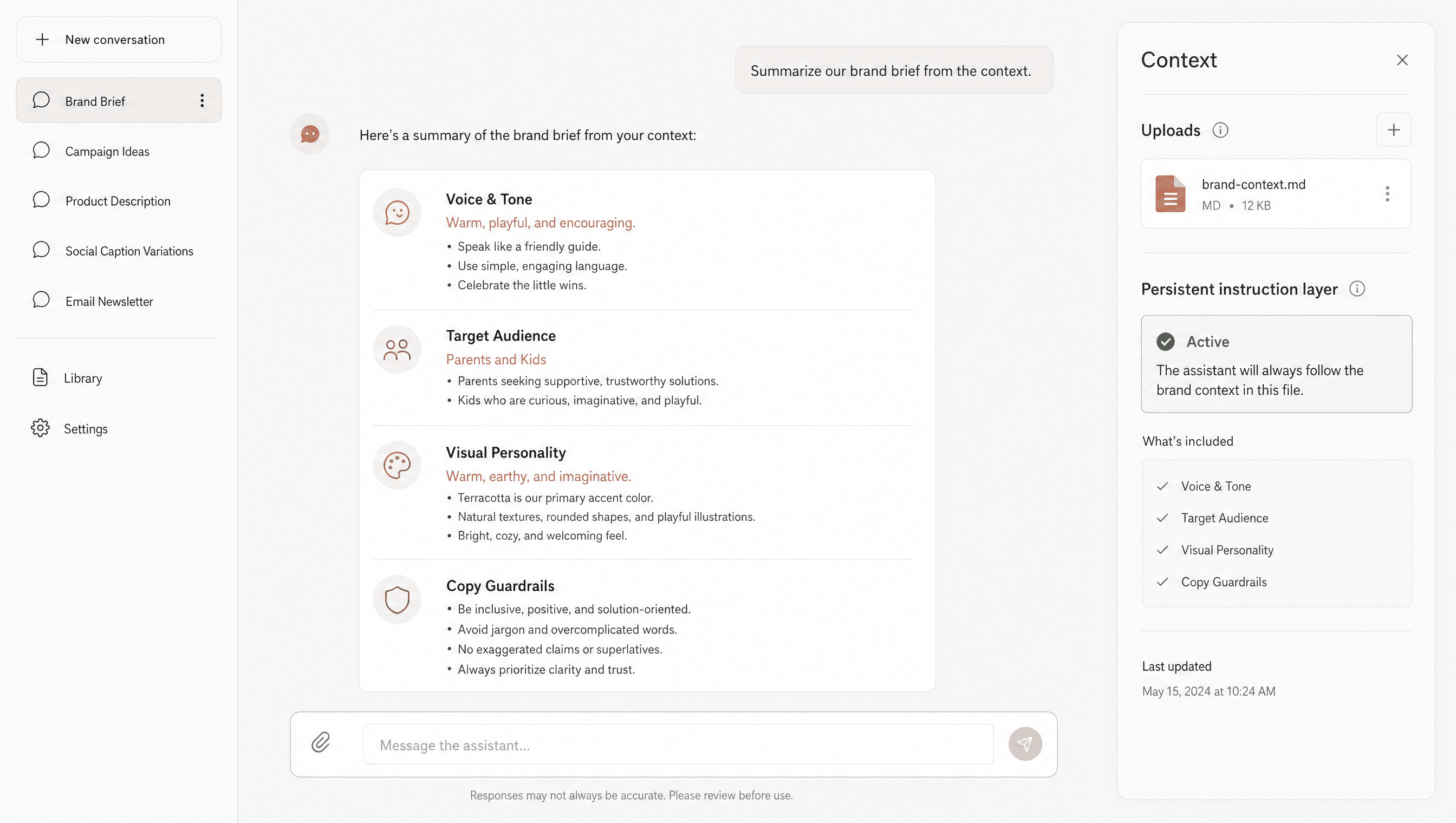
Before generating anything, we loaded Claude with the client's brand context — a SKILL.md file containing the brand voice, target audience, visual personality, and copy guardrails. This acts as a persistent instruction layer so every output in the session inherits the brand without us re-prompting it each time.
The tone brief covered the key tensions we needed to hold: warm and playful for parents and kids, but credible and conference-ready for the product and design audience at Config. Claude's ability to hold both registers in the same session — switching between UGC-style social copy and landing page headline copy — is what made this workflow viable at speed.
Step 2: Competitor ad research with Apify
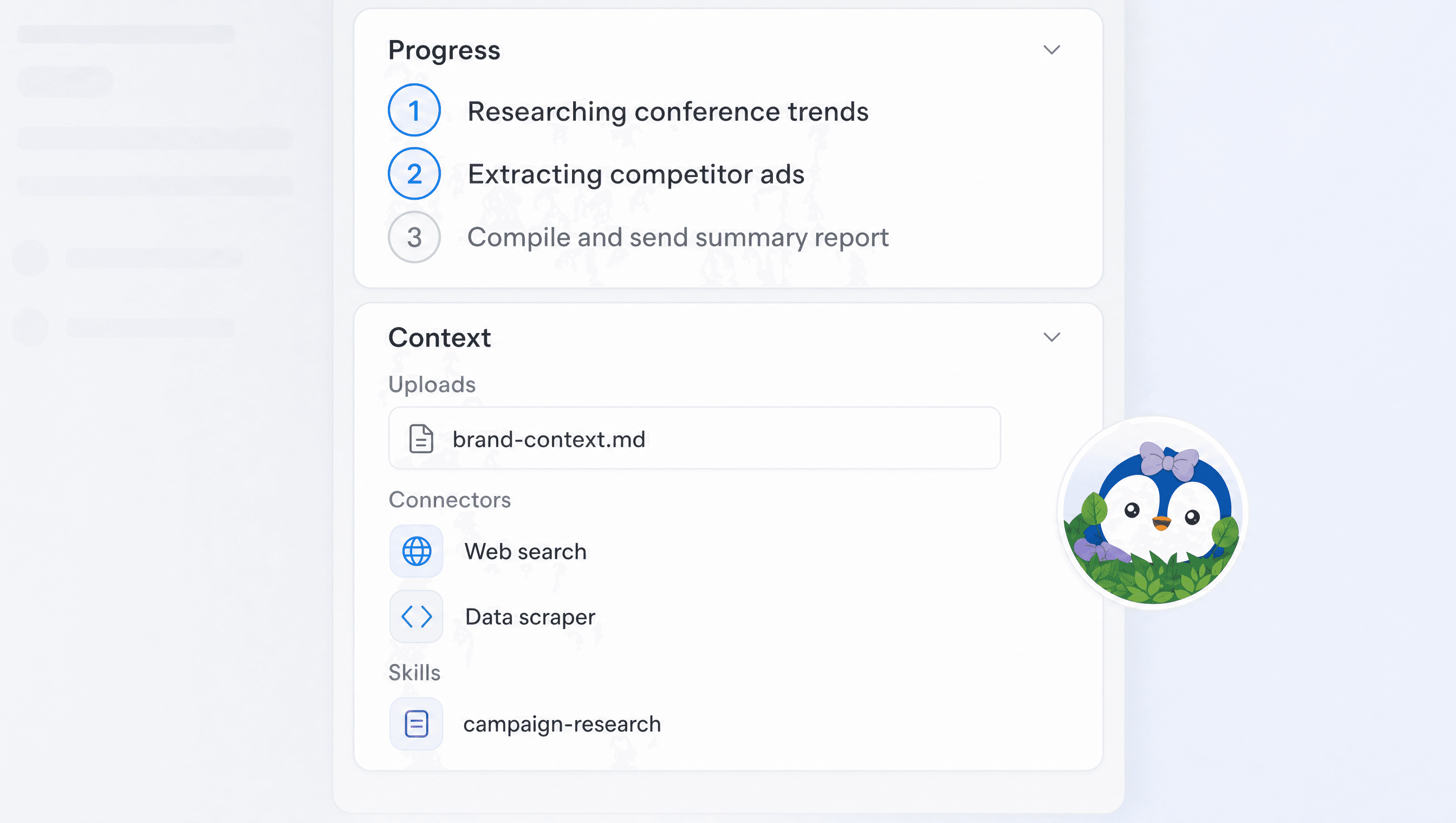
We used Apify to pull active competitor ads from Meta's ad library — searching by category keywords and filtering to the most recent active creatives. The task ran as a Claude subagent: research conference trends, extract competitor ads, compile and send a summary report to Slack.
The output was a structured brief: which visual hooks competitors were using, what claims they were leading with, and which formats were dominant in the space. That brief fed directly into the image prompt design and copy angles in the next step. Doing this by hand would have taken half a day. The Apify actor pulled it in minutes.
Step 3: Design skill for image prompt direction
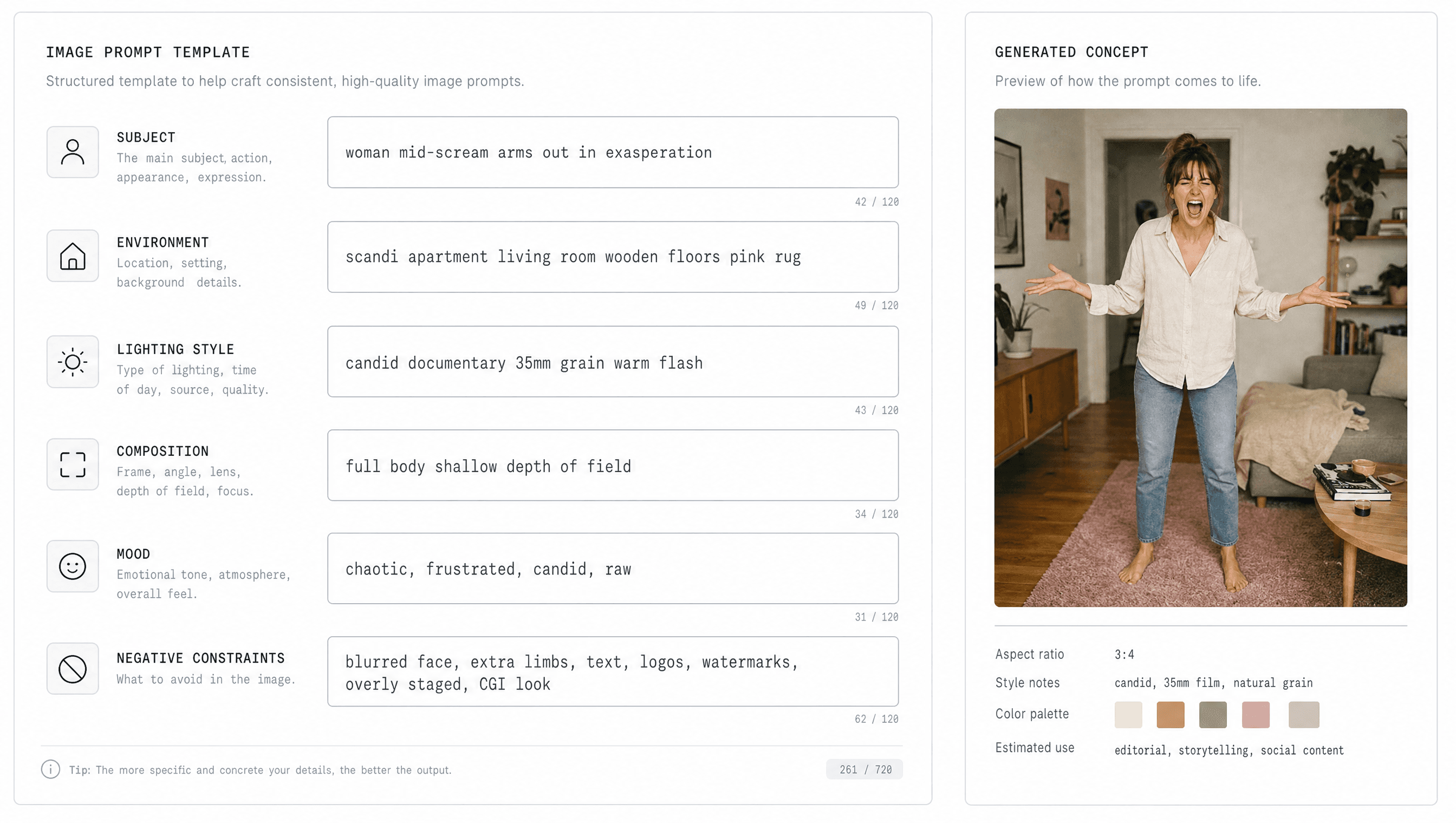
Rather than writing image prompts from scratch, we used a design skill in Claude that reads the brand context and competitor research output and suggests art direction for the campaign. The skill outputs a structured prompt per format: subject, environment, lighting style, composition, mood, and negative constraints.
For this edtech campaign, the prompt called for a mid-scream woman, arms out in exasperation, full body shot in a real apartment living room — wooden floors, a worn pink rug, scandi furniture — shot in a candid documentary fashion photography style with a grainy 35mm texture, warm indoor lighting mixed with flash, and shallow depth of field. Stylish but lived-in. Authentic human posture, no corporate stock photo energy. That level of specificity is what separates on-brand generation from generic output.
Step 4: Brand guidelines in Figma
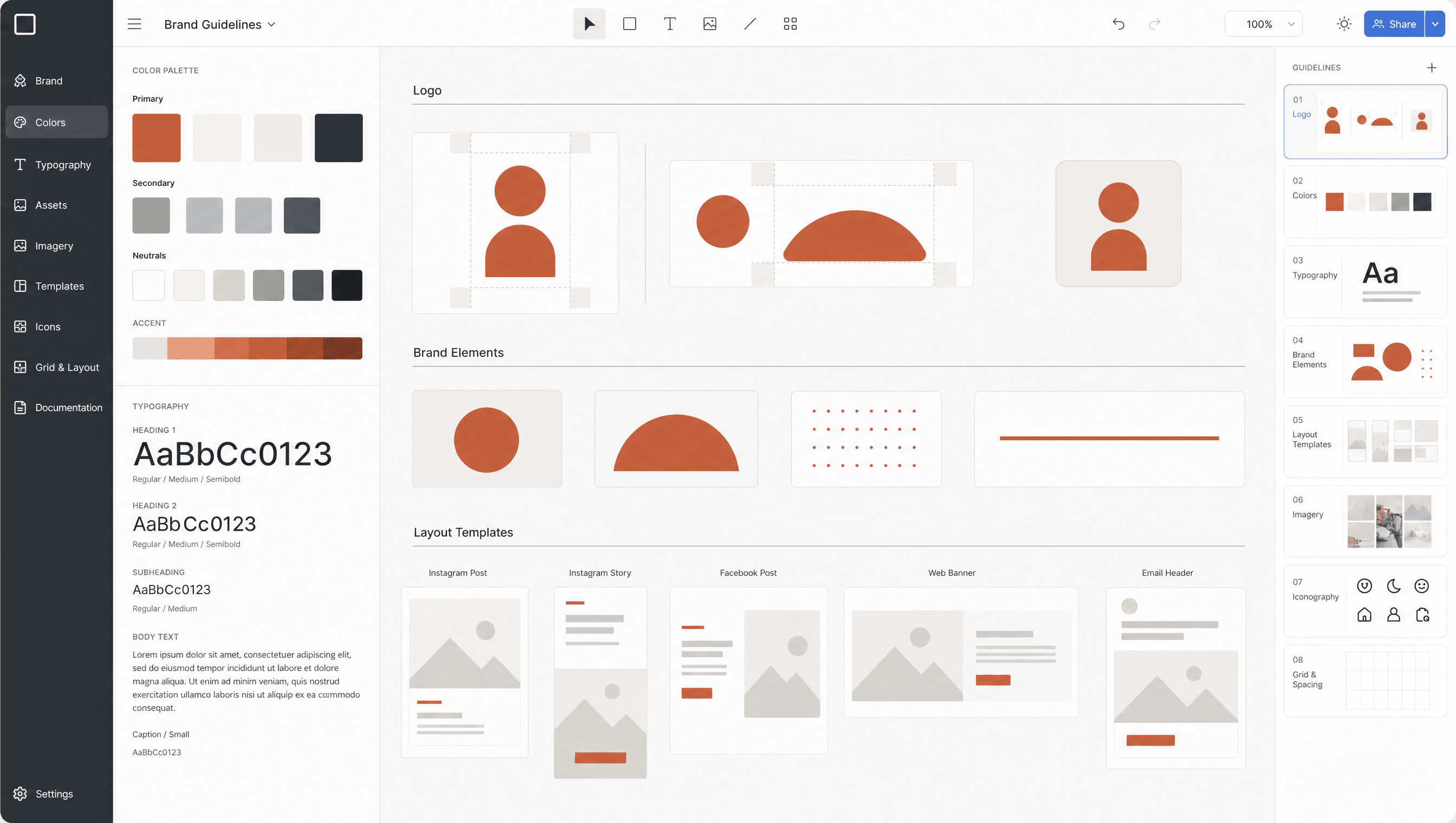
The client's existing brand templates live in Figma. We brought those in as the base layer — logo lockups, colour palette, type system, and the terracotta accent that runs through the campaign. The Figma MCP integration exists but, as of this session, is not reliable enough for programmatic asset generation. We used it for reference and template selection, then moved production to a different tool.
Step 5: Asset generation with Gemini and art direction
With prompts structured and brand templates ready, we moved image generation into Gemini. The workflow: select the template in Figma, hand the prompt to the agent chat extension, use generated by Claude copy.
We produced four ad formats in this pass: 1×1 square, 4×1 tall banner, 2×1 landscape, and wide landscape. Each format had the same creative concept — chaotic living room energy, terracotta brand colour, client logo lockup — adapted for its aspect ratio. Claude wrote the on-artwork copy for all four, matched to the energy of the visual and held together across every format size.
Step 6: Landing page for the campaign
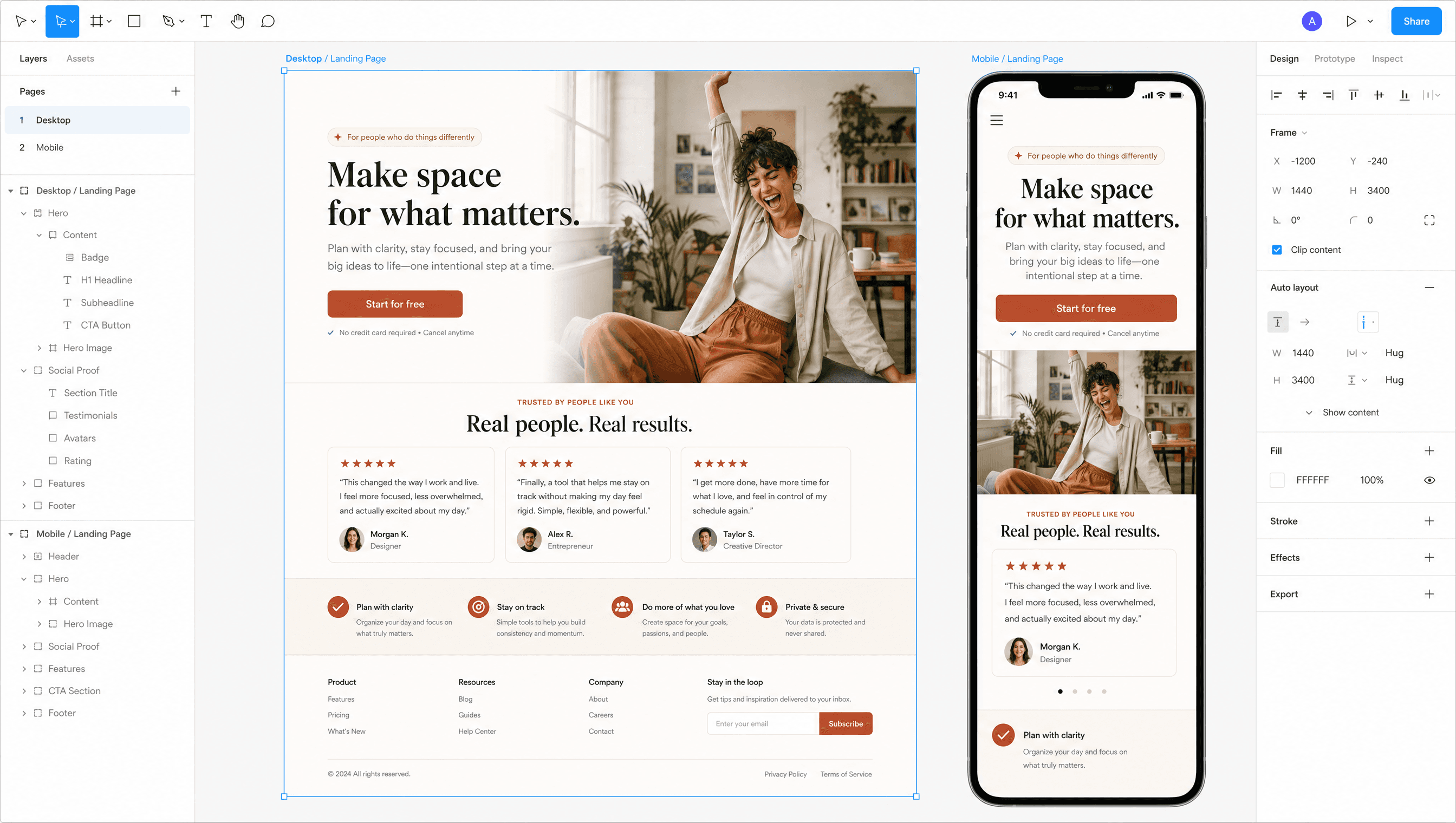
With the ad creative done, we moved to the campaign landing page — desktop and mobile versions. Claude generated the page architecture, copy hierarchy, and component structure; the same brand reference images and guidelines were passed as context so the landing page and the ads stayed visually connected.
The mobile adaptation was not an afterthought. We selected the reference images and client brand guidelines as context and asked Claude to generate a mobile-first version alongside the desktop layout, both pulled from the same Figma template base. The output was a complete page spec: hero, social proof block, product CTA, and footer — ready to hand to production.
Step 7: UGC social video from first and last frame
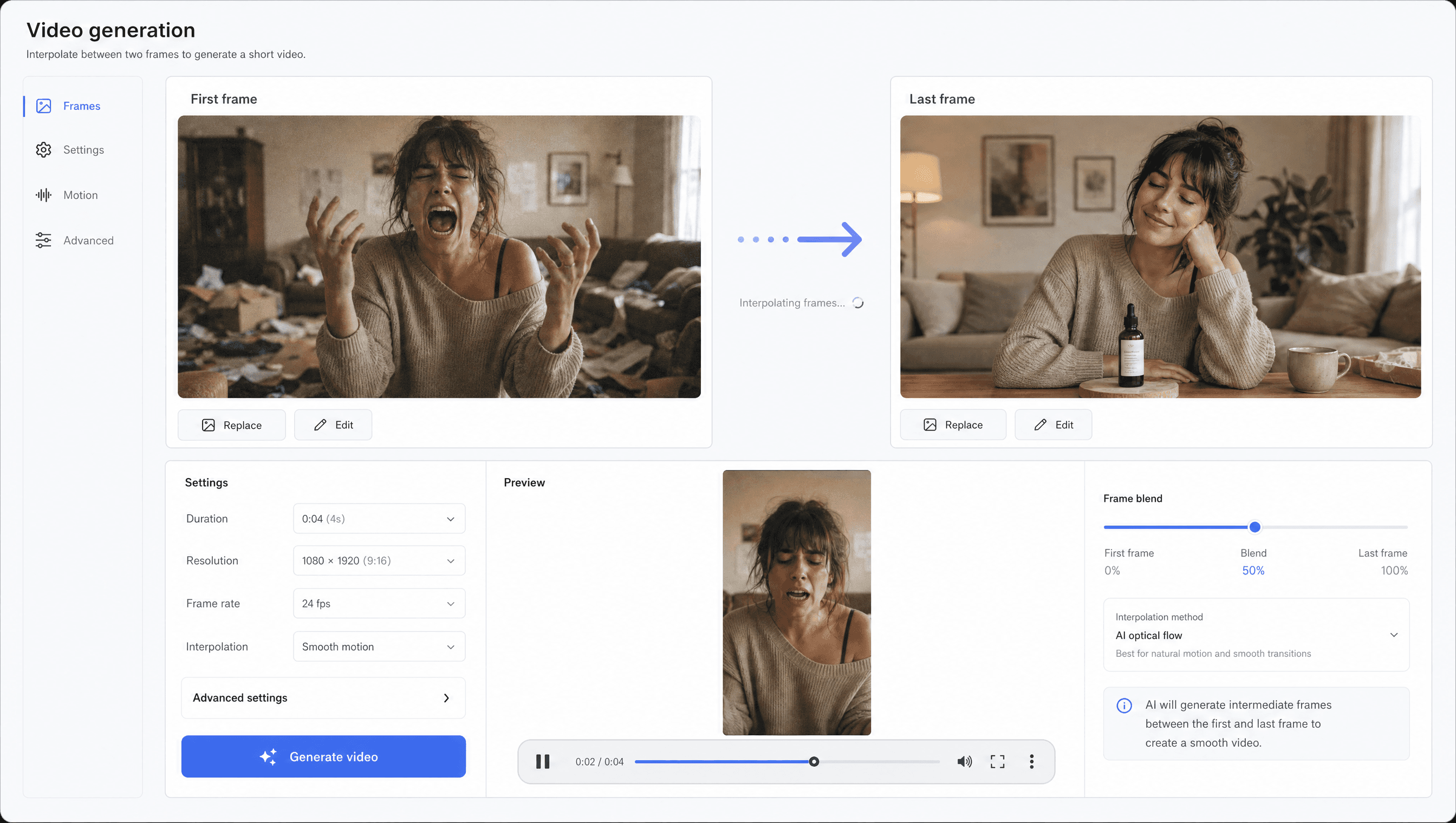
UGC-style video was the last major creative deliverable. The workflow mirrors the banner approach: generate the first frame and the last frame as images — using the same prompt structure as the banner ads so the visual language stays consistent — then pass both frames to Gemini to generate the video between them.
The first frame was the chaos moment: woman mid-scream, living room in frame, energy at peak. The last frame was the resolution: calm, product visible, brand mark in frame. Gemini interpolated the in-between, producing a short UGC-format clip with the same grainy, warm visual texture as the stills. No separate video brief, no separate shoot, no separate edit.
Step 8: Merch design
The final deliverable was a merch design for the conference — a piece the client could bring to Config to hand out or sell. The same brand context, the same art direction, the same copy tone applied to a different output format. Claude suggested the concept; Gemini generated the artwork; the Figma template gave us the mock-up.
The whole campaign — competitor research, eight ad formats, a landing page, a UGC video, and a merch design — ran in a single session. The workflow is reproducible: load brand context, run the research agent, generate prompts from the design skill, produce assets in Gemini, write copy in Claude against the same brief. The tools change; the architecture stays the same.
What this workflow actually proves
The case study is not really about speed, although speed is part of it. It is about the difference between a tool workflow and a system. Each step in this session was informed by the previous one — the competitor research shaped the prompt direction, the prompt direction shaped the asset structure, the asset structure shaped the landing page and video. Nothing was produced in isolation.
That connective tissue is what AI-native campaign production looks like when it is built properly. Claude held the brand context across the session. Apify pulled the market data. Gemini handled high-volume image and video generation. Figma provided the template base. No single tool did everything, but together they ran a complete creative campaign in one sitting — at a quality level that matched what a traditional agency would take two weeks to deliver.
Before you run this workflow for your client
8 items